Measurement & metrics
The full free AI audit: a tour of the on-demand PDF report
Suparanku's Free plan includes one AI brand audit with ChatGPT and Google AI Overviews, five-axis analysis and a site crawl of up to 1,000 pages. Results appear in the dashboard and the audit-ready email links there. From Overview, the user can generate a data-dependent PDF on demand. No card is required.
A full audit — now free for everyone
We’ve opened the free AI brand audit to everyone. It is not a one-query teaser: within Free-plan limits, the initial run builds business context, measures two AI engines and audits the site. Sign-up requires no card, and Free is a permanent plan rather than a timed trial. The live results appear in the dashboard. The audit-ready email links to those results; a PDF is generated only when the user requests one from Overview.
The audit shows how ChatGPT and Google AI Overviews answered a defined set of questions about the brand, competitors and cited sources. It is the first measurement in AI Representation Management: the discipline and system for managing how AI represents a business through context, measurement, PLAYBOOK-versioned recommendations, customer-published work, tracked URLs and re-measurement. GEO, LLMO and AEO are tactics inside that loop.
What actually happens during the audit
Behind the word “audit” sit several parallel investigations — and the report makes the depth of each one visible:
- Onboarding starts with the domain. The user enters the brand’s domain and may add competitor domains. The system then generates the business profile, market context, aliases, topics and prompts automatically; there is no manual review/topics/prompts wizard.
- The AI engine scan. Each prompt runs through ChatGPT and Google AI Overviews with three samples per prompt–engine pair, and the answers are analyzed across five axes: visibility, position in the answer, sentiment, competitors and cited sources. SparkToro found that brand lists and their order vary sharply between runs. Three samples reduce single-run noise, but they remain directional; they do not establish statistical significance or causality.
- The site audit. A crawl of up to 1,000 pages checks robots controls, structured data, metadata, links and structure. SRPS is a 0–100 readiness score, not a citation forecast. The initial deep check of the homepage also includes Lighthouse lab-performance diagnostics.
- Recommendations. Findings become a prioritized action list automatically. Deterministic technical items can include implementation guidance. Content briefs are generated on demand on eligible paid plans; the Free monthly content-brief quota is zero.
The screenshots below come from a demo report for the fictional brand Mikazuki. Its numbers, domains and competitors are invented; the report structure is real. The “Suparanku × Supasaito” header illustrates partner co-branding.
Demo slide 1: the whole picture on one page
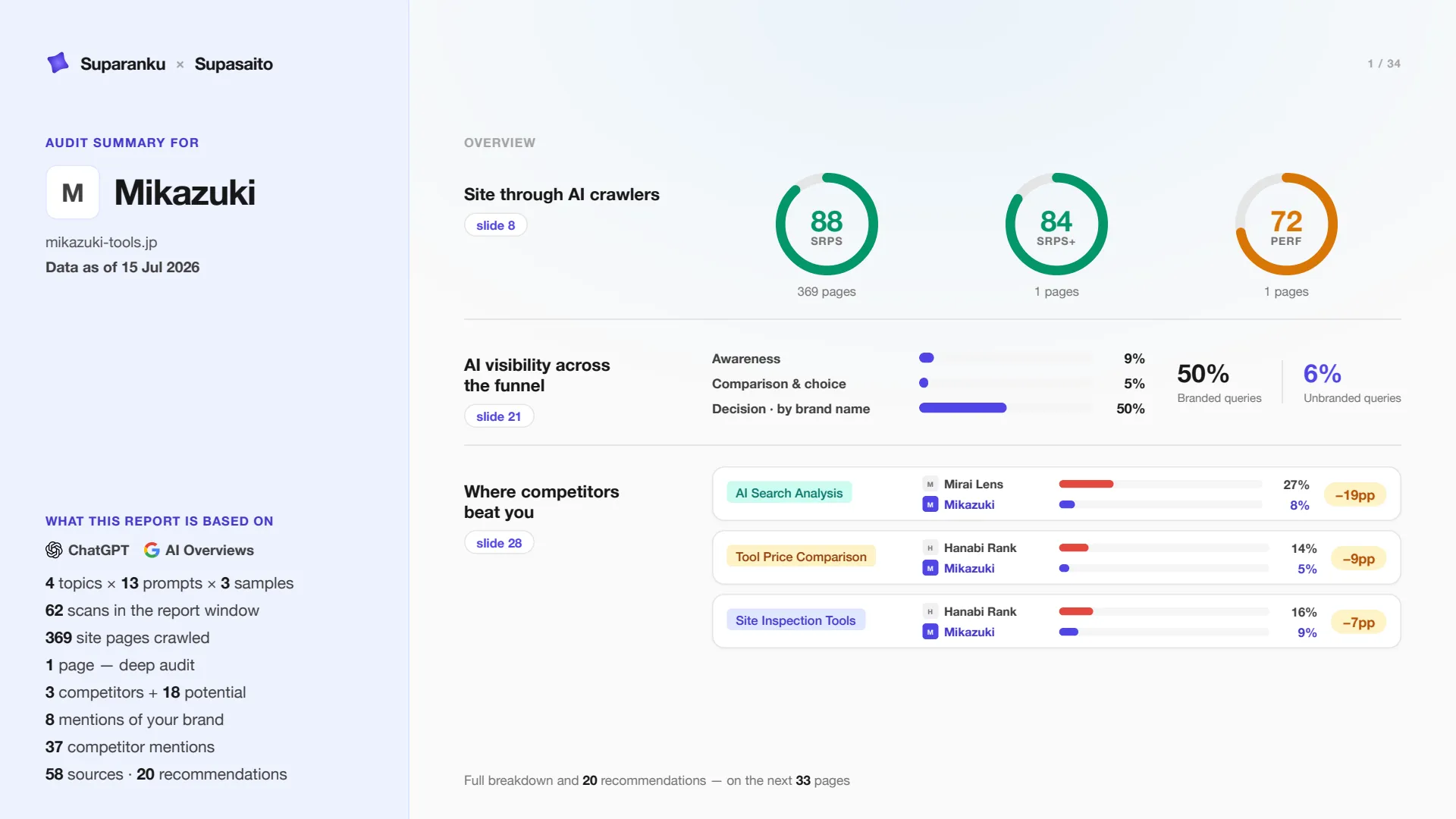
Demo slide 1 — the cover.
The cover summarizes technical readiness, visibility by funnel stage and the largest competitor gaps. It also states the measurement scope: engines, topics, prompts, samples, crawled pages, competitors, mentions and cited sources. An executive can see the demo brand’s baseline and the page references for each detail section.
Demo slides 8–15: how your site looks to retrieval systems
The site-audit block shows technical readiness: domain and robots controls, page checks, structure, broken links, social-preview signals and a separate homepage performance slide. It does not predict whether an AI system will cite the site.
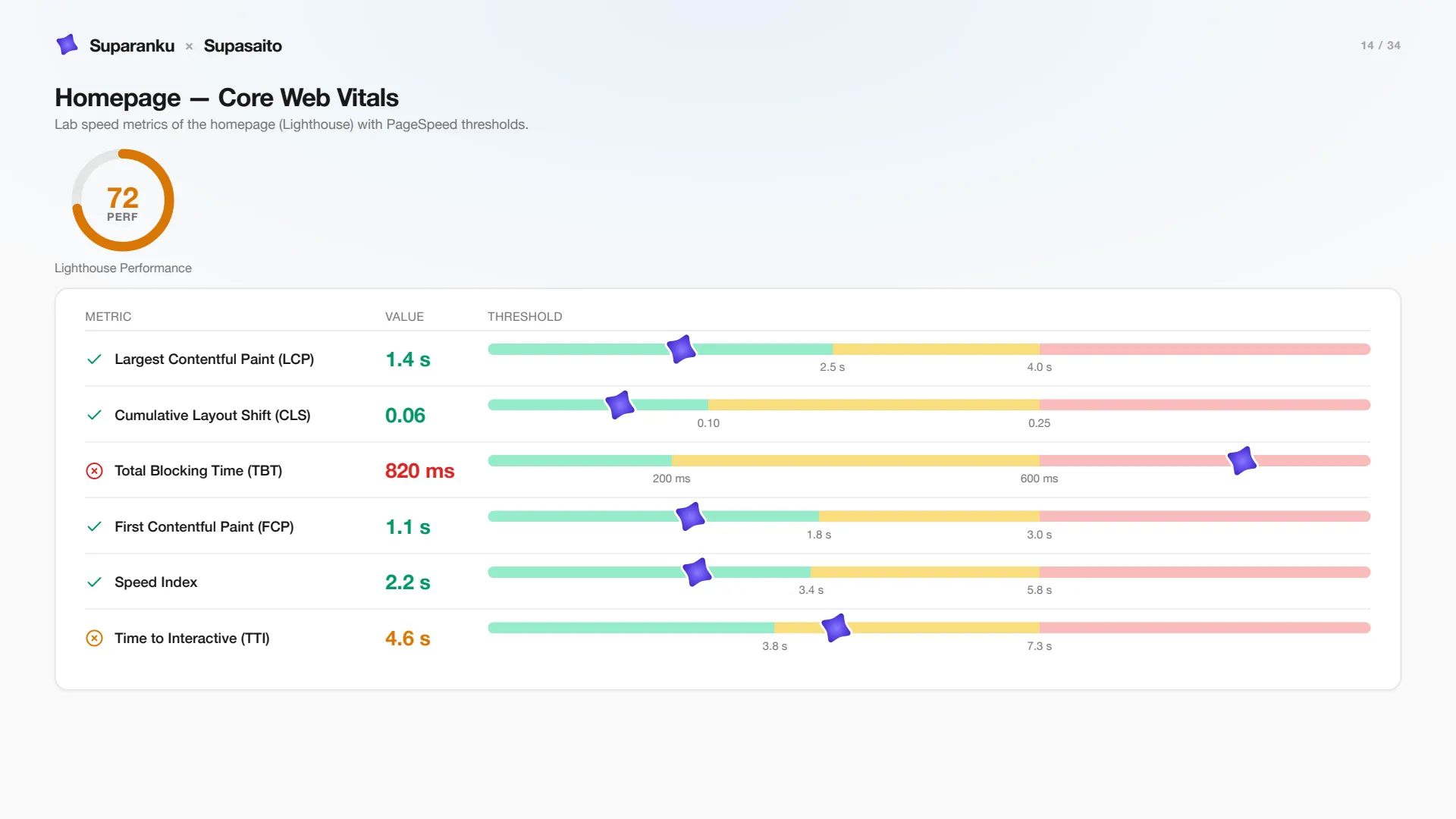
Demo slide 14 — the homepage’s Lighthouse lab speed metrics.
The demo plots LCP, CLS, TBT, FCP, Speed Index and TTI against Lighthouse thresholds. In this controlled lab run, LCP and CLS fall in the healthy range while Total Blocking Time is red, pointing to main-thread work worth investigating. Lighthouse is not real-user Core Web Vitals; field data such as CrUX or RUM can differ.
Demo slide 21: where the sample brand appears
Next comes AI visibility. The questions are classified by funnel stage, and visibility is aggregated for each stage.
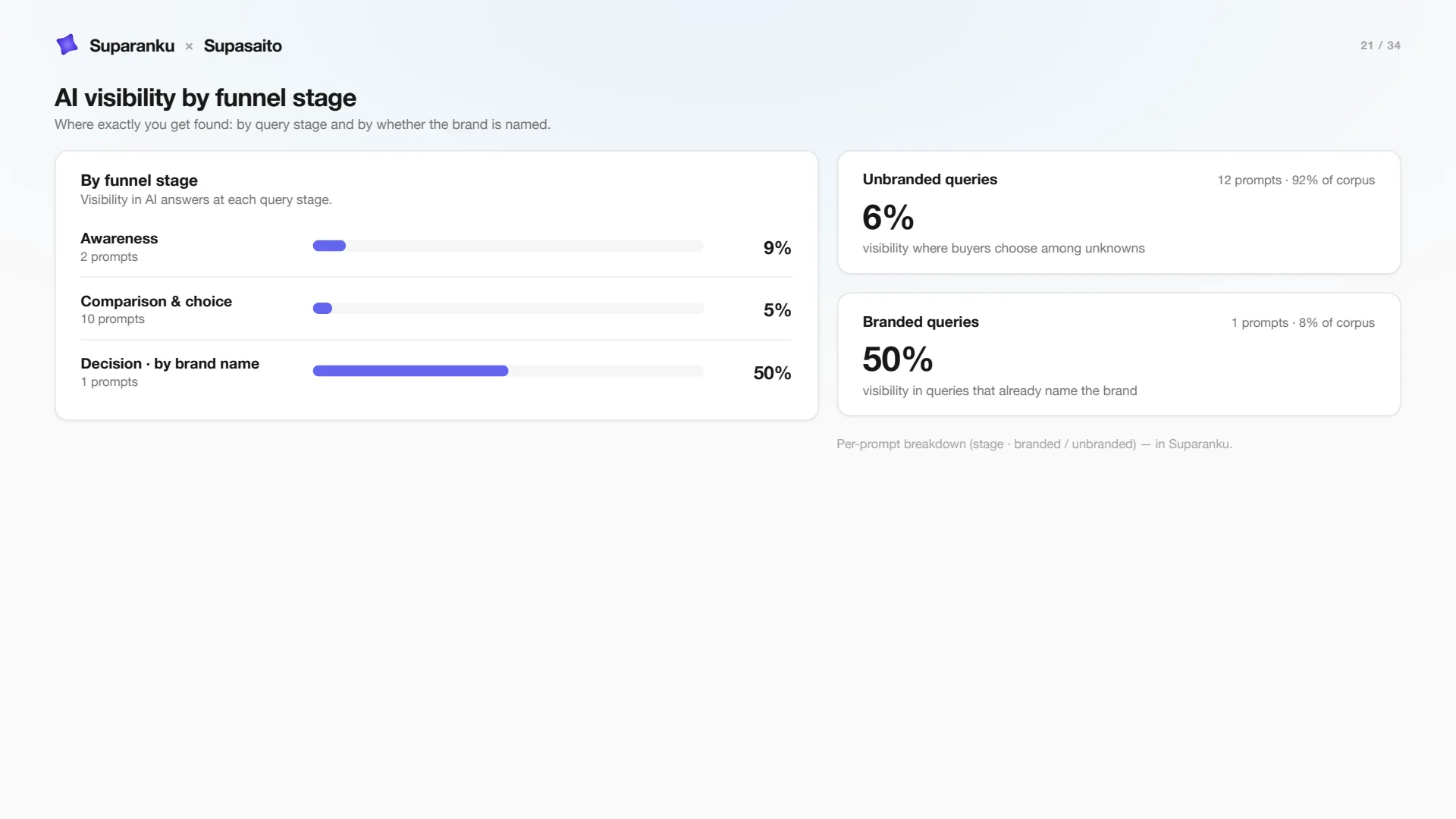
Demo slide 21 — visibility by funnel stage and the branded / unbranded split.
In this demo, visibility is 50% for questions that name the brand and 6% for questions that do not. Unbranded questions make up 92% of the sample, so the recommendation queue treats that difference as a gap to investigate. These are fictional Mikazuki values, not a general benchmark.
Demo slide 26: sources cited in the sample
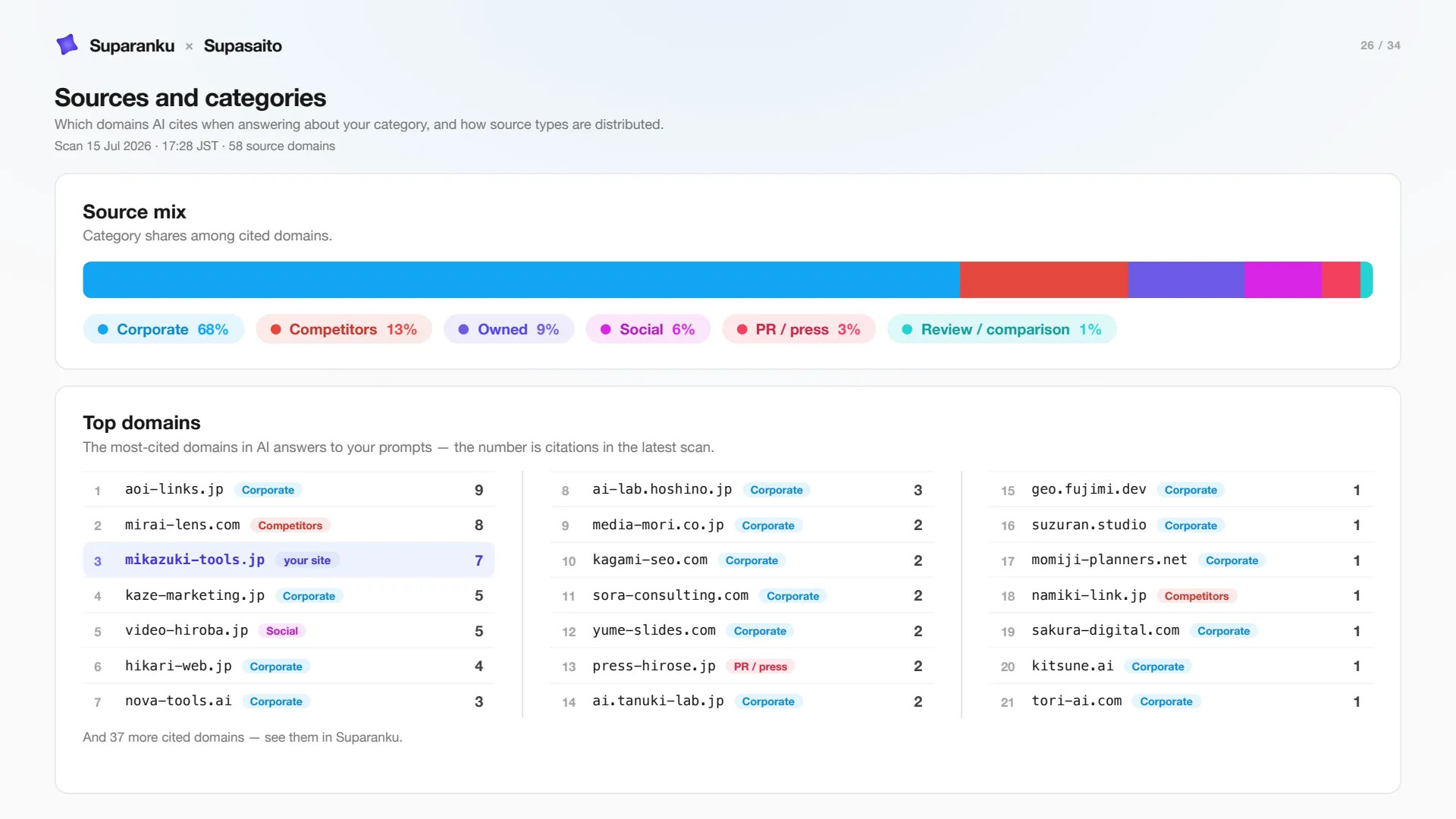
Demo slide 26 — the mix of cited sources and the top domains.
The report groups observed cited sources into corporate, owned, social, PR and review categories, and lists the most-cited domains. The brand’s own site is highlighted so the reader can compare it with the rest of the measured source set.
Demo slides 28–29: competitor and source gaps
The competitor block starts with a topic-level comparison.
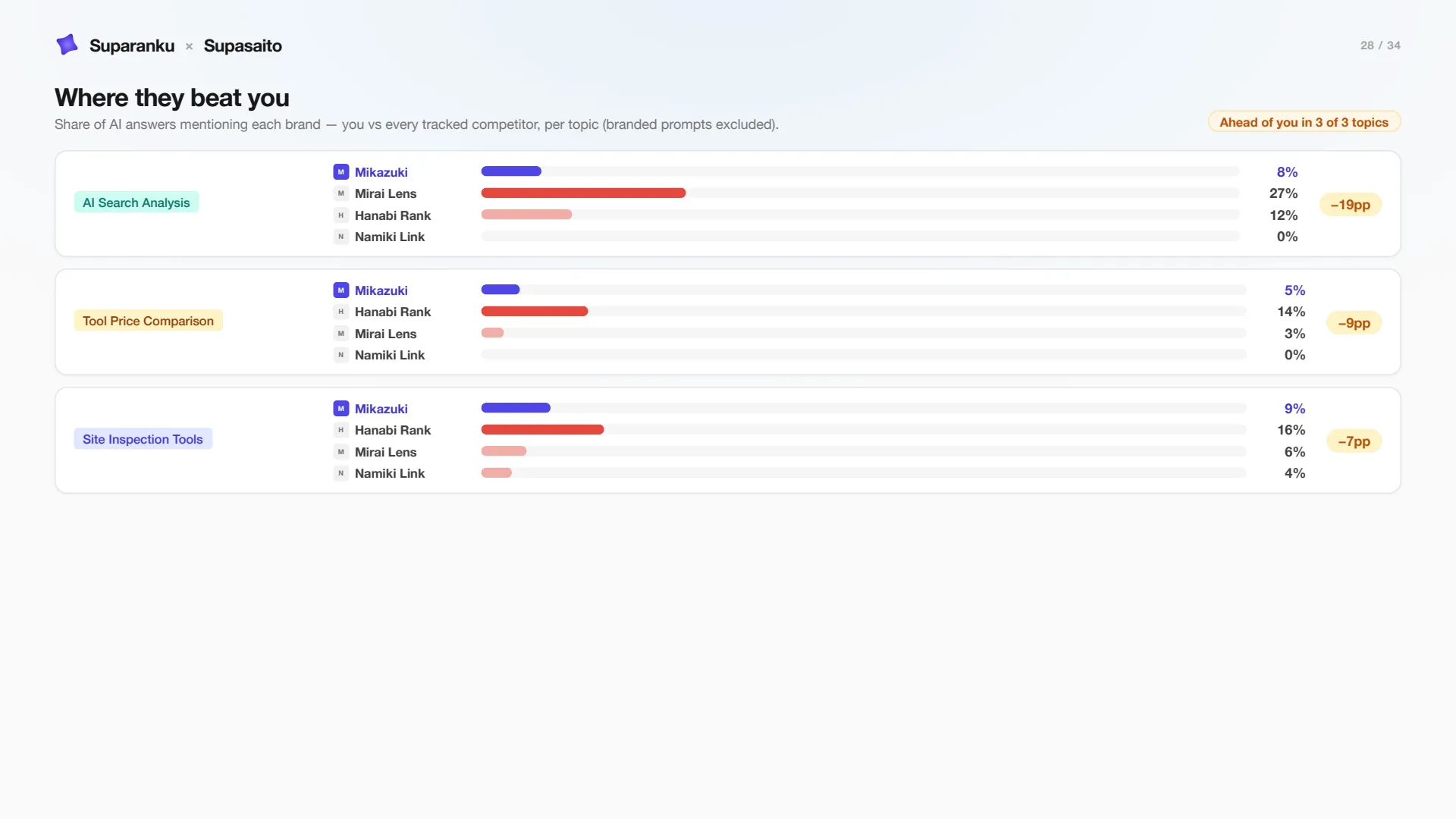
Demo slide 28 — percentage of AI answers with a mention, by topic and tracked brand.
For each topic, the report shows the percentage of answers that mention each tracked brand and the percentage-point difference. Questions that name a brand are excluded from this comparison.
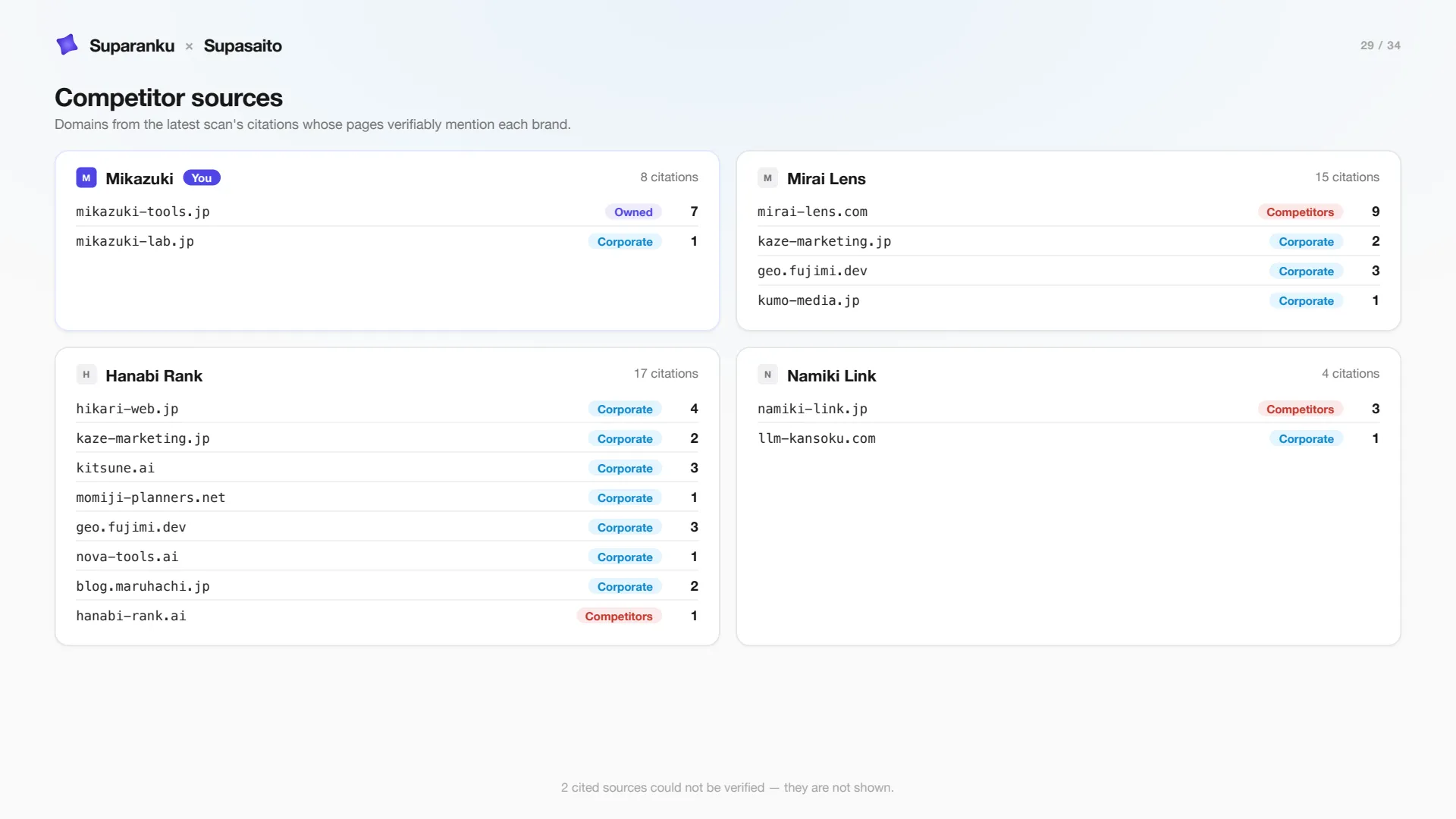
Demo slide 29 — domains whose pages verifiably mention each brand.
This view shows domains whose pages verifiably mention each competitor. It is useful evidence for investigating a source gap, but it does not prove why a competitor leads or that publishing on the same domains will produce the same result.
Demo slide 32: prioritized recommendations
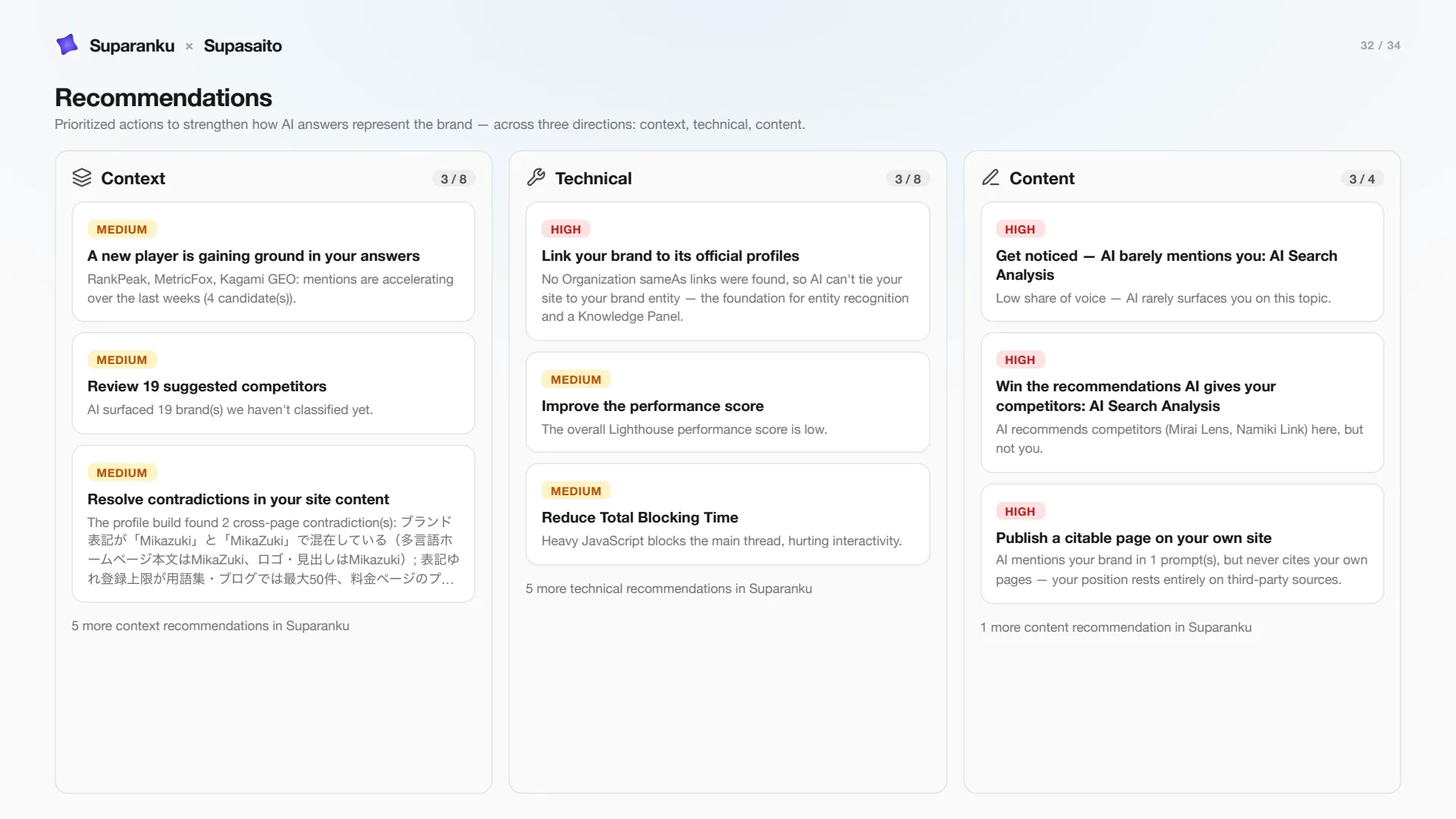
Demo slide 32 — prioritized recommendations across three categories.
The demo closes with prioritized recommendations across context, technical and content. The full queues live in the product. Recommendations are generated automatically, but not every card has a ready generated brief: deterministic technical findings can carry implementation guidance, while content briefs are requested separately and consume a paid-plan quota.
Accessing report data through MCP
The Suparanku MCP server lets compatible external clients retrieve audit data, metrics, recommendations and report metadata. Authorized write tools can request a report or update recommendation workflow fields. Actual availability still depends on the external client’s MCP support, its plan and administrator settings, plus Suparanku company access, membership role, credential scopes, quotas and destructive-action restrictions. MCP is available on current paid plans.
How to get your report
- Sign up — no card needed.
- Enter the brand domain and, if useful, competitor domains. The system generates the profile, topics and prompts.
- When the initial audit is ready, follow the email link to the dashboard results.
- On Overview, choose Download PDF to generate the current report on demand.
The report is generated in the selected interface language — Japanese, English, Russian, Italian, Korean, Spanish, German, French or Portuguese. Its sections and slide count depend on the available data. The slide numbers in this article identify the Mikazuki demo only; a customer’s report may number or omit those sections differently.
Honest about expectations
The audit does not promise growth or prove why a metric has a particular value. It records a baseline and produces a work queue. Paid plans add scheduled measurement and on-demand brief quotas; publishing remains the work of the customer, agency or authorized agent. Later scans show what changed after publication without turning correlation into causal proof.